
vAWSie - an AI-native cloud operating system for AWS
Building the AI-native approach of using AWS

vAWSie (WOW-see) is the intelligence layer woven into every task.
Every page is “vAWSie looking at your account from a different angle.”
The core philosophy: organize by what users WANT TO DO, not by what AWS calls things.
This product is not trying to be “a better AWS console,” we already have a wonderful and powerful AWS console. It is trying to become an intent-driven operating layer over AWS, where the
system understands what the user is trying to achieve,
maps that to cloud primitives, and
then explains the cloud back in the user’s language.
This idea was the core, and it would show up repeatedly in every feature I built, especially around organizing by what users want to do, not by what AWS calls things.
Here are the topics we’d discuss in this blog:
Why AWS needs an AI-native operating layer
Start with the right abstraction: intent, not services
The first screen should answer impact, not inventory
Why the workflow builder is only one room in the house
Designing as an intelligence layer, not a chatbot
The core system architecture: graph, control plane, execution plane
How to connect safely to live AWS accounts
What to build first, what to fake first, and what not to overbuild
Where real complexity begins: execution, permissions, and trust
What makes this a product, not just a demo
For more details about code base visit:
Github Repo
Building an AI-Native Cloud Operating System for AWS
1. AWS doesn’t need another console
If you’ve ever tried to understand a real AWS environment through the native console, you know the problem is not a lack of data. It is a lack of perspective.
AWS gives you
services, configurations, logs, policies, alarms, and dashboards,
but it rarely gives you the answer to the question you actually care about:
what matters right now, what depends on what, and what happens if this thing breaks?
That distinction should be very clear.
Amazon Q does a good job with added AI layer to each service, allowing you to understand the setup better.
But that’s APP + ChatBot. I wanted to attempt AI-native ground up approach.
vAWSie is meant to be an operating system for cloud understanding, one that treats AWS as a living system you can inspect, reason about, and act on conversationally.
That shift matters because the AWS console is organized around infrastructure ownership, while users usually think in terms of tasks and outcomes.
Users do not wake up wanting to “look at DynamoDB.”
They want to investigate why checkout latency spiked, understand what is driving cost this week, or stand up a new workflow that turns uploaded documents into structured data.
While planning to design vAWSie, we kept returning to the same principle: organize by what users want to do, not by what AWS calls things. That is not a UI flourish. It is the foundational product decision that changes everything downstream, from sidebar navigation to node taxonomy to the AI layer itself.
Once you accept that, the shape of the application becomes much more coherent. The product stops being “one workflow builder plus some extra pages” and starts becoming a full cloud workspace with distinct modes of understanding: observe, manage, build, document, and govern.
That is why the broader app model matters so much:
Command Center, Resource Explorer, Cost Intelligence, Security Posture, Workflow Builder, Architecture Studio, Knowledge Base, and Runbooks
These are not separate features bolted together. They are different views over the same underlying cloud graph.
Each one is vAWSie looking at the same account from a different angle.
Since I’ve the opportunity of starting this product from scratch, this is where I begin: not with the LLM, not with Terraform generation, and not with drag-and-drop. I begin by writing down the user questions the system must answer better than AWS does.
Questions like:
What broke?
What does this resource affect?
Why is cost rising?
What should I build for this workflow?
Which risks are real versus noisy?
That exercise forced the application to become outcome-centered before it becomes feature-rich. Without that discipline, you end up rebuilding the AWS console with a chat box attached.
2. Start with the right abstraction layer
The most important architectural idea in my vision is the abstraction model behind the builder.
Instead of exposing users to raw AWS service categories first, the system groups primitives by the role they play in a workflow:
triggers, AI, compute, data, messaging, flow logic, integrations, security, and observability.
That is a much stronger starting point than mirroring Compute, Storage, Networking, and Analytics, because it reflects how people design systems in their heads.
They think:
what starts this, what processes it, where does it store state, how does it branch, how is it secured, and how do I know it worked?
our proposed node groups map directly onto that mental flow.
A user building an automated document workflow should NOT have to mentally translate
from “I need to receive a file, extract information, make a decision, store the result, and alert someone”
into a dozen disjoint AWS services before they can even start.
That is also why the AI layer belongs inside the product model rather than floating above it. In our design, vAWSie is not just a helper that explains the UI. It is one of the core categories in the system because intelligence is part of the architecture, not a support feature.
There is a second reason this abstraction is strong: it scales from novice users to advanced ones. Beginners get a vocabulary that matches how they think.
“Function” can resolve to Lambda.
“Container task” can resolve to ECS or Fargate.
“Search” can resolve to OpenSearch.
“Vector store” can map to the implementation you choose.
That lets the product stay approachable without becoming shallow. It also creates room for the AI to make better decisions, because the prompt space becomes structured around user intent instead of a flat list of service names.
I was able to go with this implementation because of this abstraction layer.
the canonical internal model for a workflow node, a resource, a relationship, a risk, and an execution trace.
The product is strongest where those models are already coherent.
The practical takeaway is simple: if you want to build an AI-native cloud operating system,
do not start by asking “which AWS services should we support first?”
Start by asking “which user intents should become first-class objects in the system?”
Once you get that right, the service mapping, the UI structure, the AI prompting strategy, and even the documentation model begin to line up naturally.
3. The first screen should answer impact, not inventory
Most cloud tools open with inventory. They show you how many EC2 instances you have, how many Lambda functions are deployed, which regions are active, and maybe a few charts around cost or health.
That information is useful, but it is not how operators actually think when something matters. In practice,
you are rarely asking, “How many resources do I have?”
You are asking, “What is changing, what is unhealthy, what is expensive, and what breaks if this thing fails?”
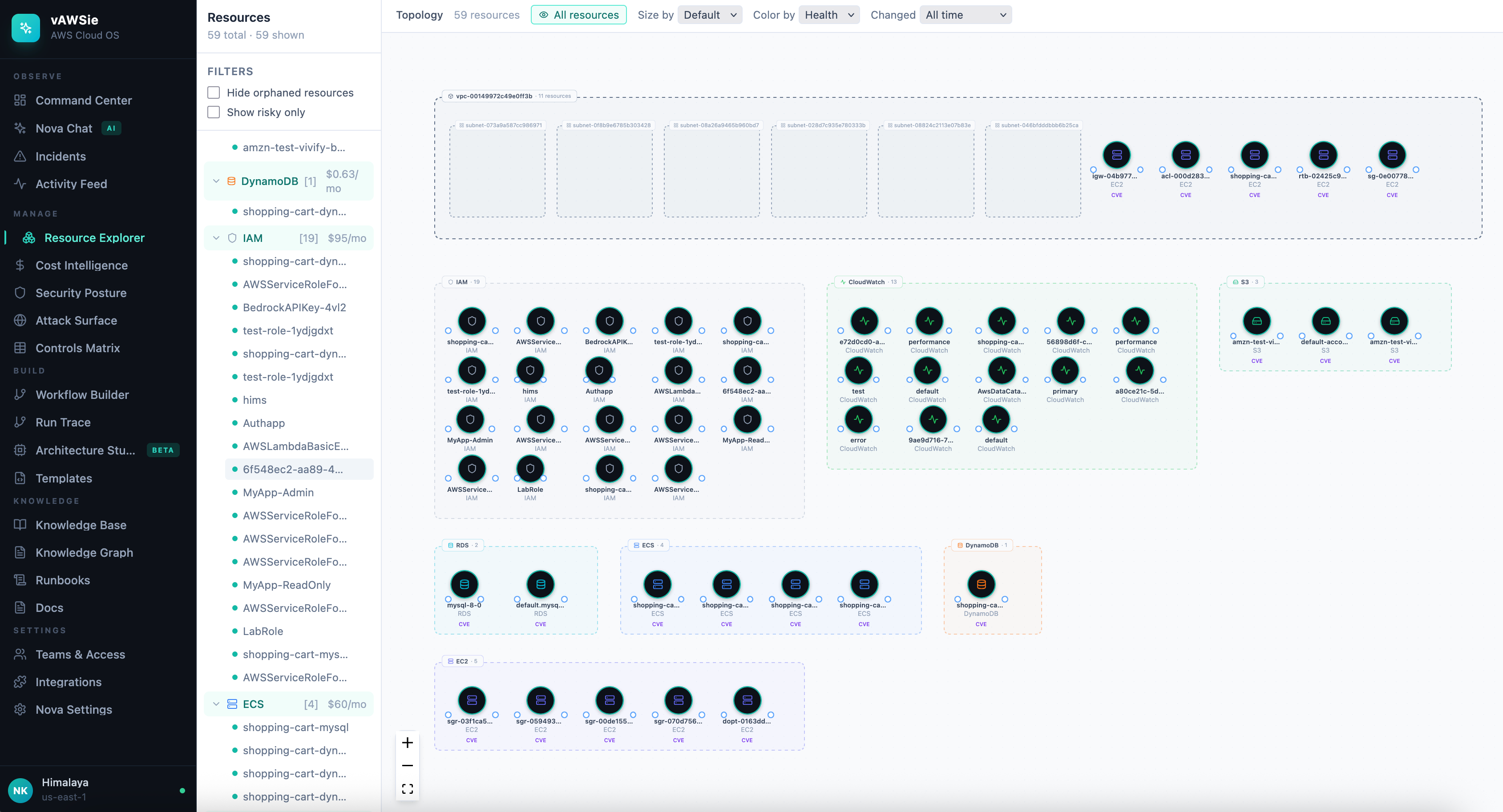
Our strongest design idea: the three-zone dashboard language.
It moves from granular items, to relationships, to grouped business impact. That is a much more intelligent opening move than a standard cloud dashboard because it teaches users to see infrastructure as consequence, not just configuration.
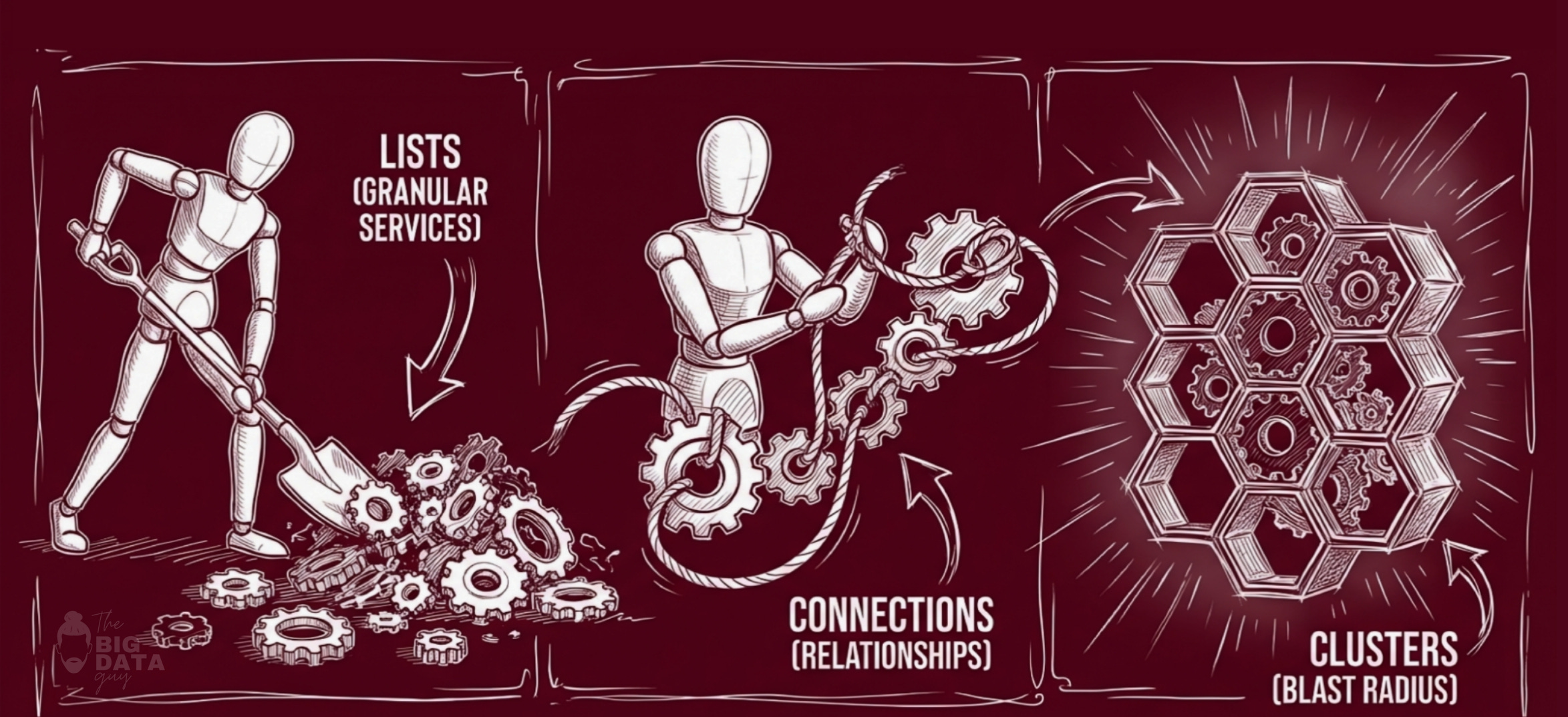
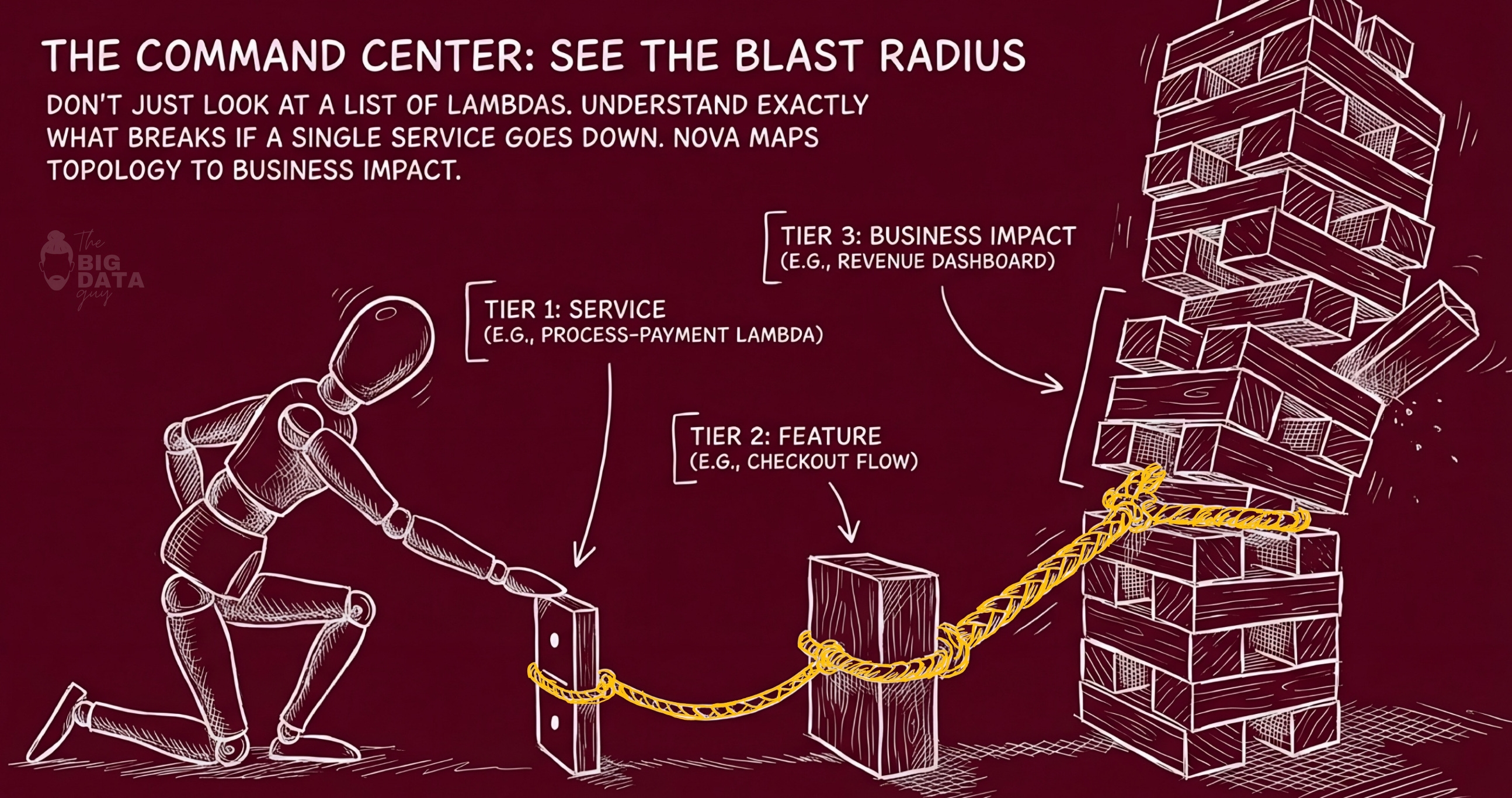
In vAWSie, a Lambda function is not just a row in a table. It is a thing with blast radius.
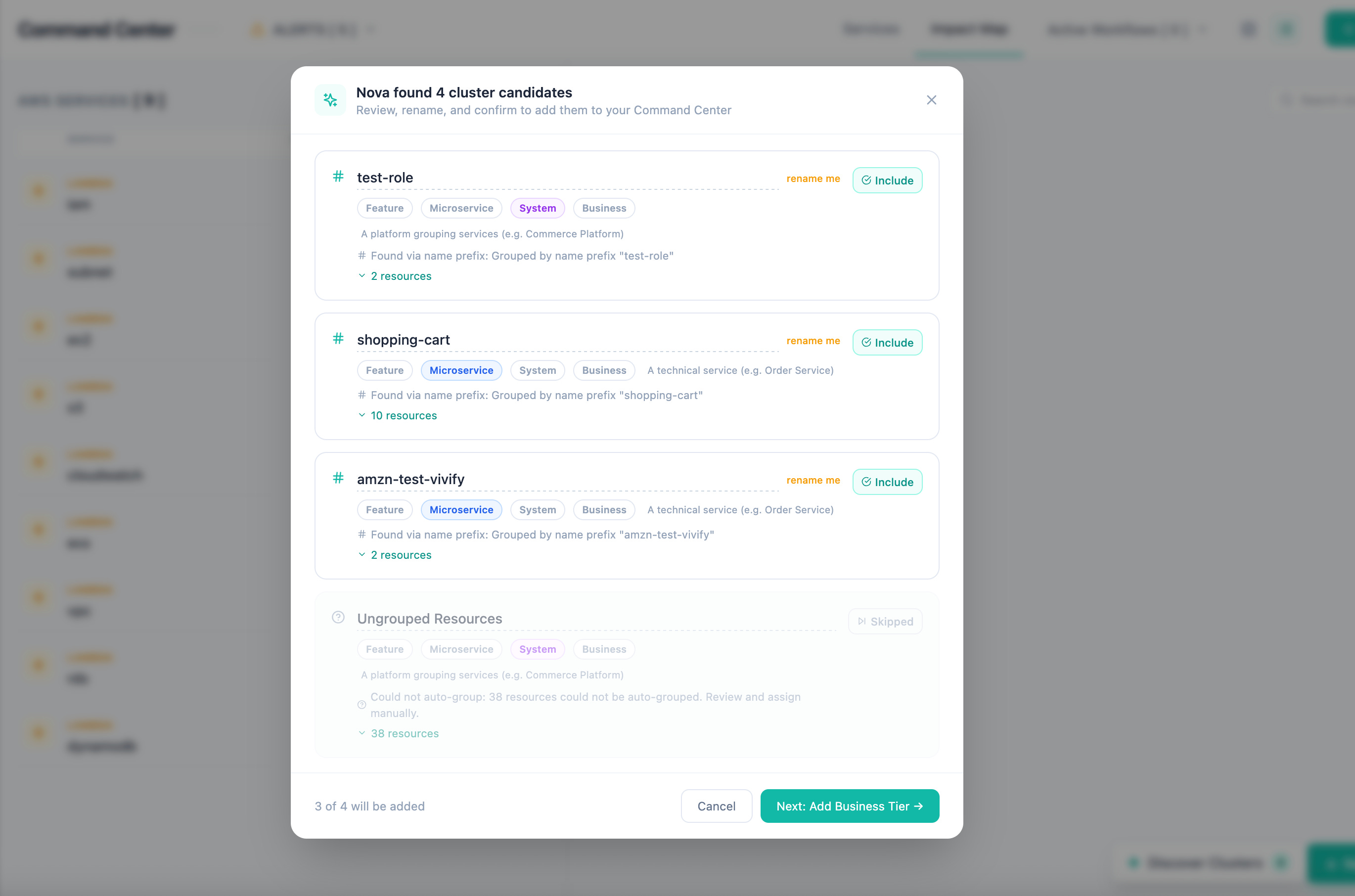
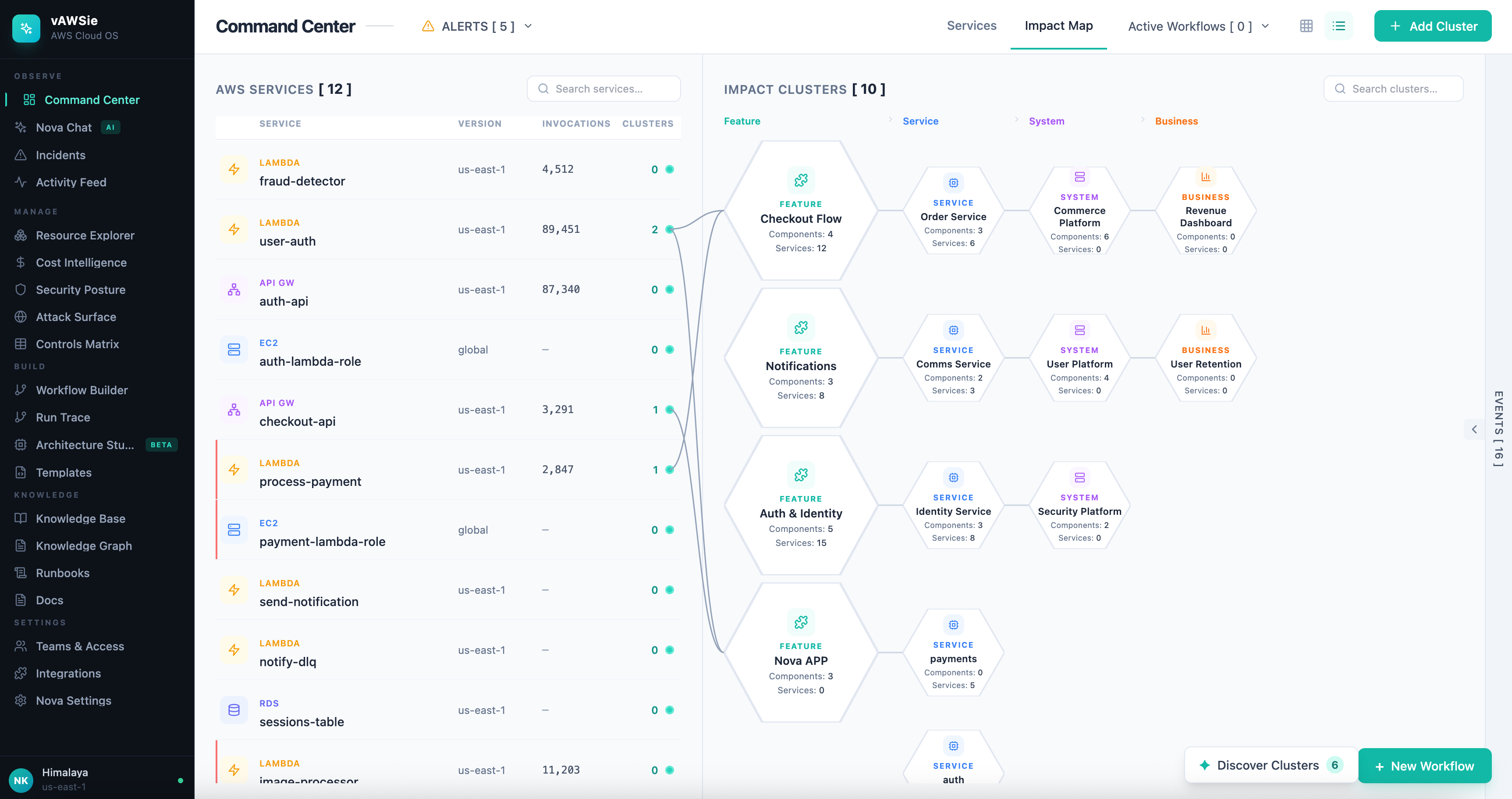
The list on the left gives you the concrete object. The relationship layer in the middle shows what it connects to. The grouped clusters on the right show where that effect accumulates: features, services, systems, and eventually business capabilities.
That means the interface is always answering a better question than AWS usually does: if this resource degrades, who feels it?
Example: process-payment flowing into checkout, then into the order system, then into revenue. That is the kind of mapping that helps both a technical operator and a product-minded stakeholder understand the same incident from their own level of abstraction.
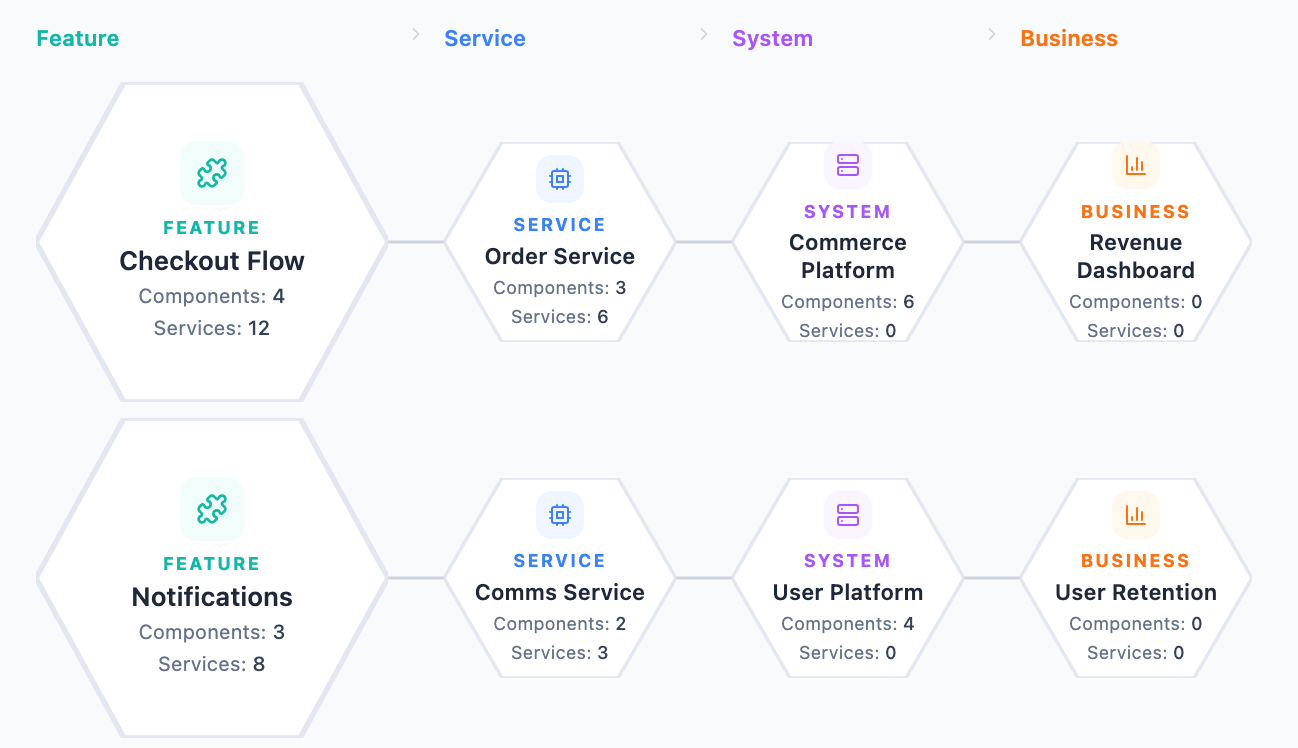
This was our first non-negotiable product milestone. It forces the right underlying model. To render that dashboard well, you need
a dependency graph,
a service-to-feature mapping,
an event model, and
a way to compute blast radius.
Those are not just UI requirements. They are the beginnings of the real data model that every later feature will depend on. Resource Explorer needs it. Incident analysis needs it. Cost attribution needs it. The AI layer needs it most of all. Once the product knows how to connect a cloud resource to a feature, a team, a system, and an outcome, every other page becomes more intelligent almost for free.
That is why I would argue the dashboard is not a summary page. It is the foundation of the entire product.
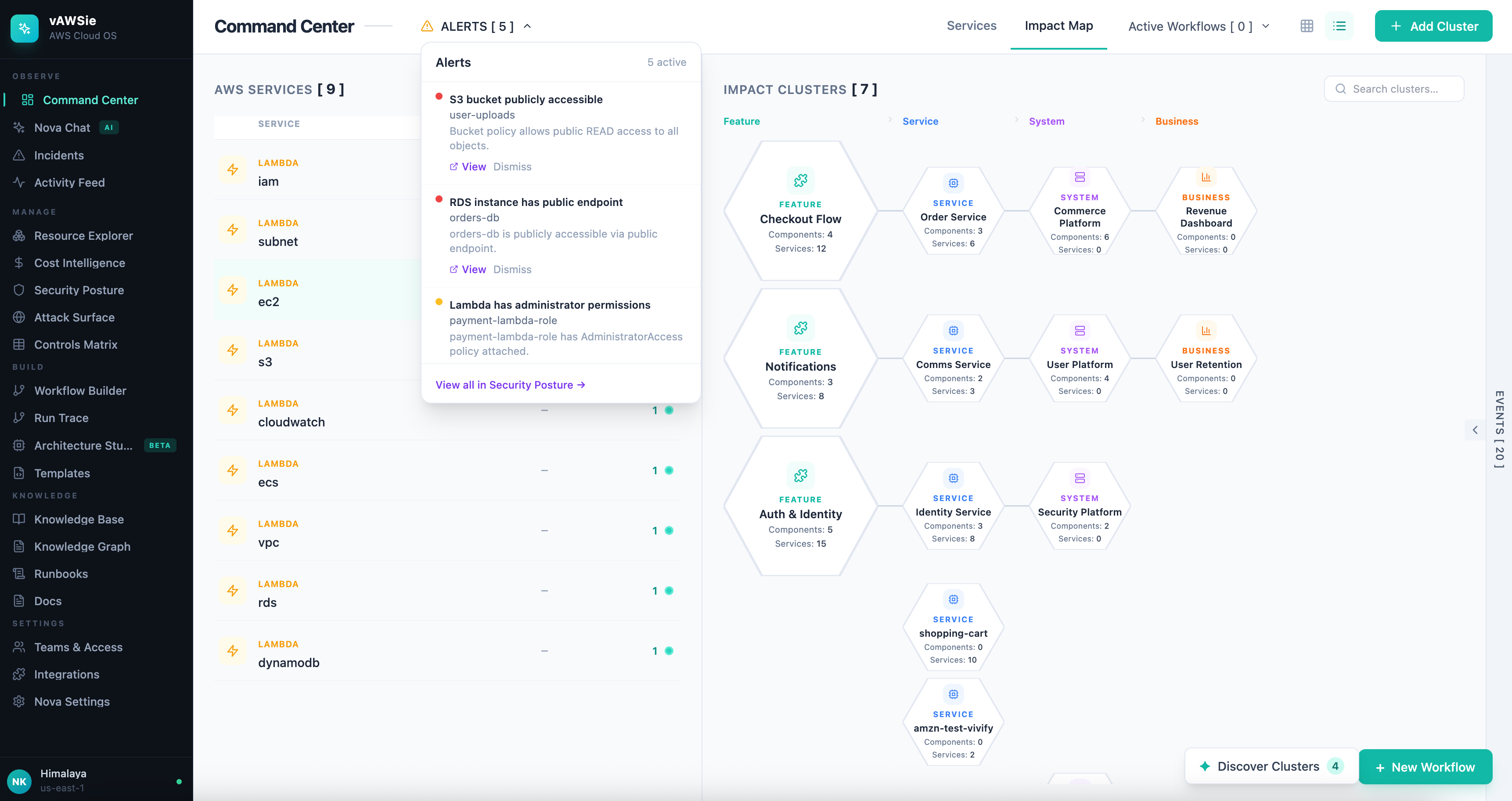
I tried this on my test account on AWS cloud, and I noticed few interesting trends that it was able to figure out.
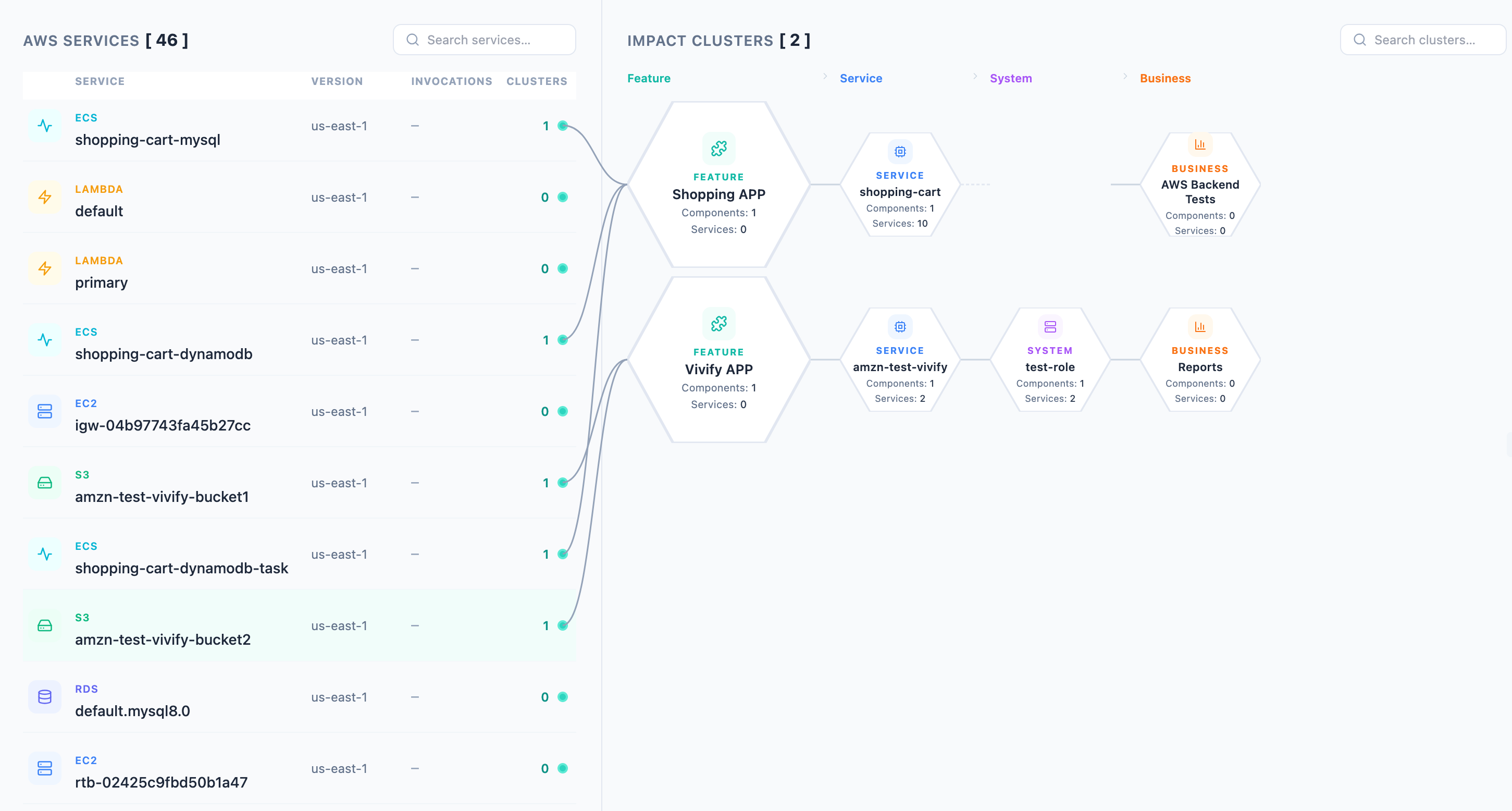
We will go deeper into each below.
The Full App Vision
OBSERVE
  ├── Command Center      ← living topology map, health pulse, cost burn rate, Nova briefing
  ├── Incidents           ← unified incident timeline, root cause AI, runbook executor, post-mortem gen
  └── Activity Feed       ← GitHub-style infra feed (who changed what, when)

MANAGE
  ├── Resource Explorer   ← "Finder for AWS": tree + relationships + filters (cost/age/risk/orphaned)
  ├── Cost Intelligence   ← attribution by purpose, waste detector, budget architect, what-if simulator
  └── Security Posture    ← live score, exposure map, IAM analyzer, secrets scanner, compliance profiles

BUILD
  ├── Workflow Builder    ← drag-drop canvas (THIS IS WHAT WE HAVE NOW) — design mode + live mode
  ├── Architecture Studio ← whiteboard/PDF → diagram + IaC + cost estimate + security analysis
  └── Templates           ← gallery of pre-built flows

KNOWLEDGE
  ├── Knowledge Base      ← auto-docs from infra changes, arch decisions, search
  ├── Runbooks            ← generated from workflow history
  └── Docs                ← living documentation

SETTINGS
  ├── Accounts & Regions
  ├── Teams & Access      ← spaces, activity feed, review requests, audit trail
  ├── Integrations
  └── Nova Settings
Key Design Principle : The Dashboard’s Three-Zone Language
ZONE 1: LIST              ZONE 2: CONNECTIONS       ZONE 3: CLUSTERS
(granular items)    ──→   (relationship lines)  ──→  (grouped impact, hexagonal tiers)

AWS Lambda funcs          Connections.           Feature groups
  process-payment    ─────────────────────────→  [Checkout]  →  [Order System]  →  [Revenue]
  send-email         ─────────────────────────→  [Notifs]    →  [User Retention]
  auth-check         ─────────────────────────→  [Auth]      →  [All Features]
Tier depth = blast radius
The ZONE 3 CLUSTERS are meant to show the logical groups on your AWS cloud, split into tiers.
Tier 1 (direct): the feature that directly calls this Lambda
Tier 2: the system/service that owns that feature
Tier 3: the business capability built on that system
Tier 4+: the downstream dashboards/revenue/users impacted
The answer the UI provides: ”If this Lambda dies, what features break for users?”
4. Why the workflow builder is only one room in the house
A canvas can help users assemble automation, but it does not by itself explain their environment, document their decisions, show cost consequences, surface security risk, or help them debug failures. If you build the builder first and let the rest of the product trail behind, you end up with a smart-looking automation tool that still forces the user to leave the product every time they need real context.
vAWSie is stronger because it treats building as one mode inside a much larger operating layer.
A serious cloud workflow is never just a graph of steps. It has dependencies, permissions, cost behavior, failure modes, and operational history. So the builder should not be thought of as a self-contained feature. It should be treated as a composition surface connected to the rest of the system.
A user might discover a broken dependency in Command Center, inspect the affected resource in Resource Explorer, redesign the flow in the builder, validate the architecture in Architecture Studio, and then rely on Runbooks and Incidents when something goes wrong later.

That is a real operating loop. It is much closer to how cloud teams actually work than the isolated “drag blocks onto a canvas” model.
This is also why the AI layer has to be embedded across the system instead of living only inside the builder sidebar.
If vAWSie only helps you draw a workflow, then it is a generation feature.
If vAWSie can also explain blast radius, inspect live resources, reason about incidents, propose tighter permissions, summarize overnight changes, and generate documentation, then it becomes a true intelligence layer.
That distinction matters enormously. One is a convenience. The other is a product category.
From an implementation perspective, this changes how you sequence development. You do not start by making the canvas infinitely expressive. You start by defining the shared concepts that make all sections interoperable:
resources, relationships, workflows, executions, incidents, cost slices, security findings, and knowledge artifacts.
Then the builder becomes one interface over that shared model. That is a healthier architecture than letting the builder invent its own private world.
5. The Implementation Layer
Up to this point, the story has been about abstraction, user intent, and why an AI-native cloud OS should exist at all. This section is where that vision stops being philosophy and starts becoming systems design.
Lets focus on building the missing control surfaces that make the product operable: a real generation pipeline, a reliable credential boundary, a shared model layer for cloud resources, a typed runtime for vAWSie, and safety gates before anything becomes publishable.
So how did we build vAWSie app?
This app was build as a sequence of engineering pivots. Each pivot reduced one kind of brittleness.
First, architecture generation had to become real.
Then it had to become reliable under malformed model output.
Then AWS access had to become global and consistent.
Then model selection and agent orchestration had to become explicit.
Then the editor had to stop pretending resources were generic forms and start reading live cloud shape.
Then execution had to be gated by linting, permissions, and publish checks.
That sequence matters because it mirrors how you should build a system that’s security-first and works.
A. Start with a concrete generation pipeline
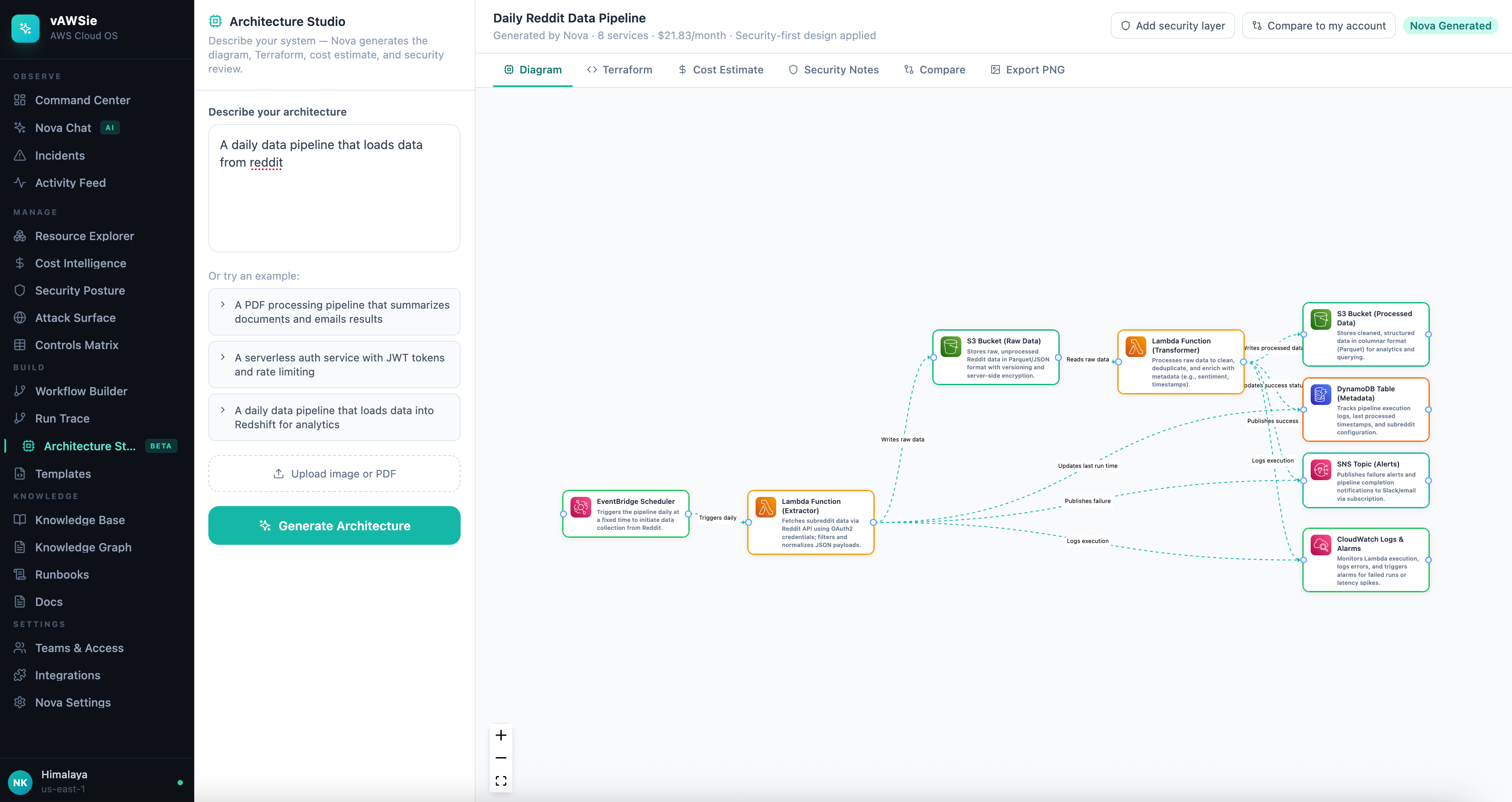
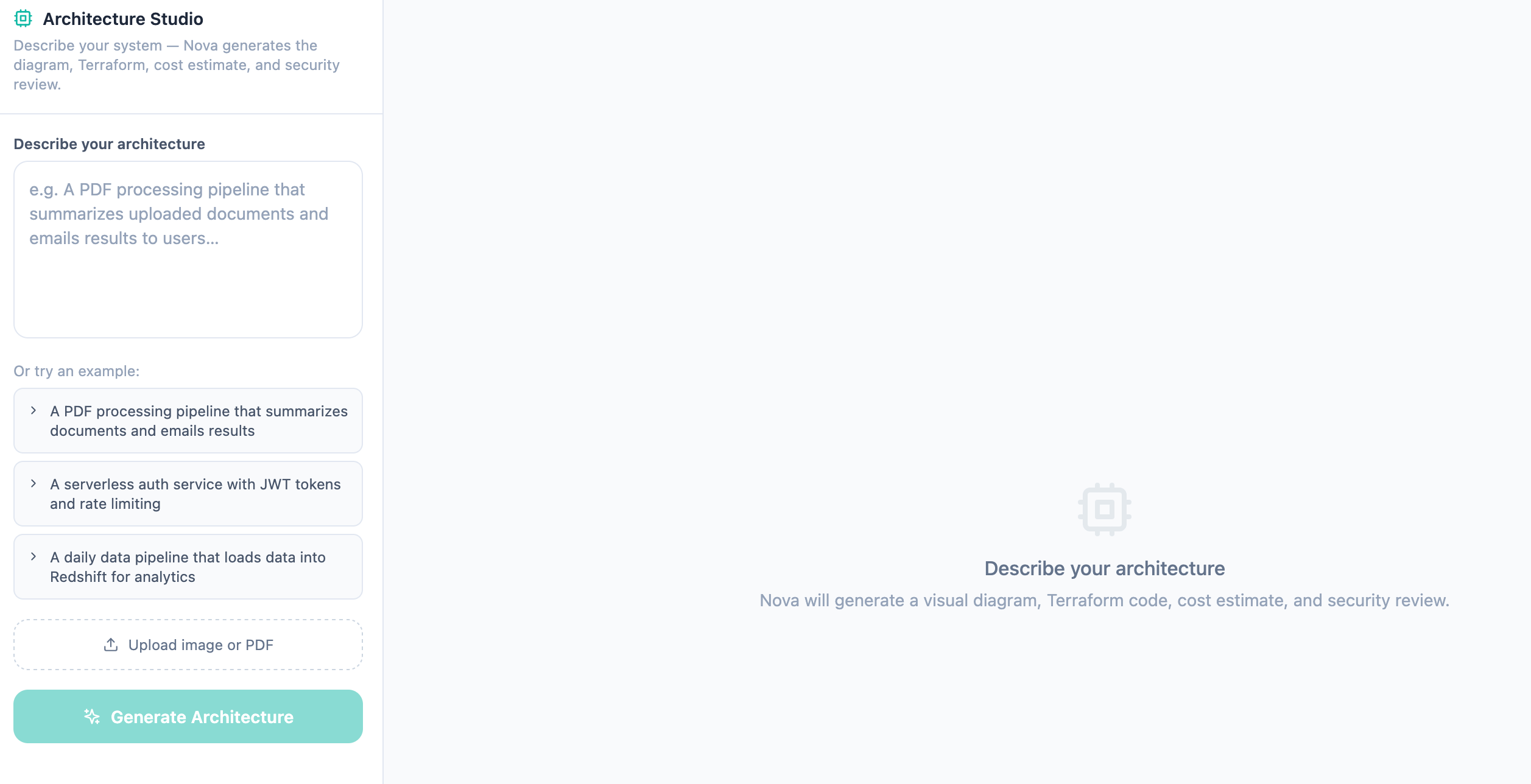
The first major technical move was to turn Architecture Studio into an actual pipeline rather than a static diagram surface. That meant supporting three distinct input paths:
text description
PDF upload
image upload

All three needed to converge into the same normalized output shape: nodes, edges, Terraform, cost, and security notes.
Generation pipeline contd.

A few design choices here are worth calling out:
First, all input modalities were normalized into the same downstream contract.
That sounds obvious, but it avoids a common trap
building three different feature paths that all drift over time.
In vAWSie, text, PDF, and image are just three ways of getting the system to the same architecture object.
Second, layout and security augmentation were treated as deterministic post-processing stages
rather than tasks delegated back to the model.
The model proposes intent and structure.
The application owns spatial layout, security defaults, and output normalization.
Implementation pattern
At this stage, the backend responsibility split looked roughly like this:
architectureGenerator.tshandles generation orchestrationarchitecture.tsexposes the Architecture Studio API surfaceArchitectureStudio.tsxowns the interactive client experienceupload helpers extract text from PDFs and a description from images before generation
That separation is important because it keeps the model-facing logic out of the UI and makes generation testable as a backend service.
What the studio had to become after the first version worked
Getting the first end-to-end generation path working was only the start. Once the feature was usable, a more interesting set of problems appeared.
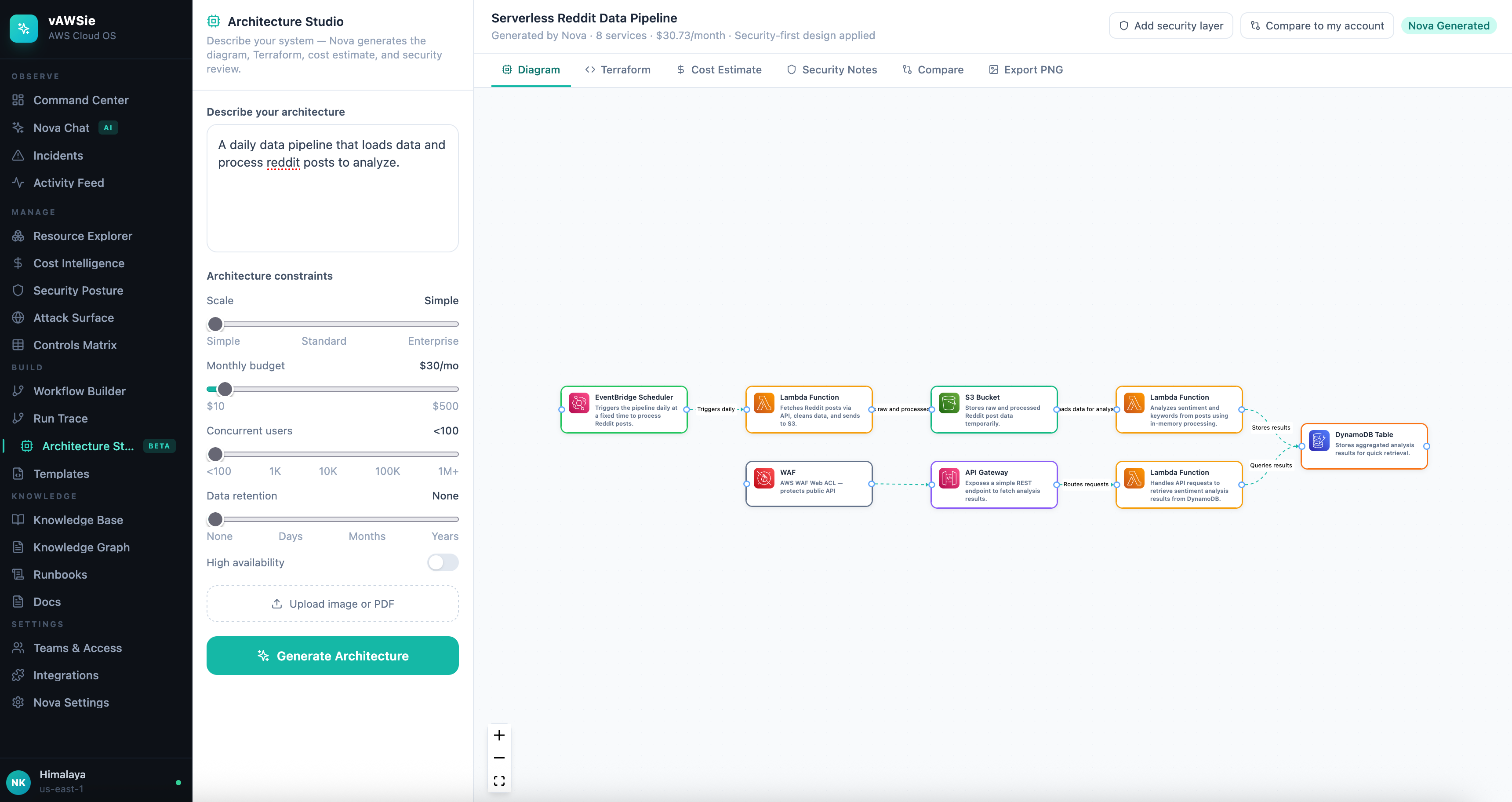
Free-form prompting alone produced too much variance for the same architecture description. In practice, the model might over-design a small data pipeline by introducing services that made sense abstractly but violated the user’s cost or scale expectations.
The page kept the three hardcoded examples for discovery, but once the user started typing, those examples gave way to structured controls: scale, monthly budget, expected users, retention horizon, and availability preferences. Those controls were serialized back into the prompt so the model was not just answering what should I build? but what should I build under these constraints?
The next problem was that the studio needed to become an inspection surface, not just a generator. Terraform had already existed as an output tab, but the useful work started when that tab turned into a review loop.
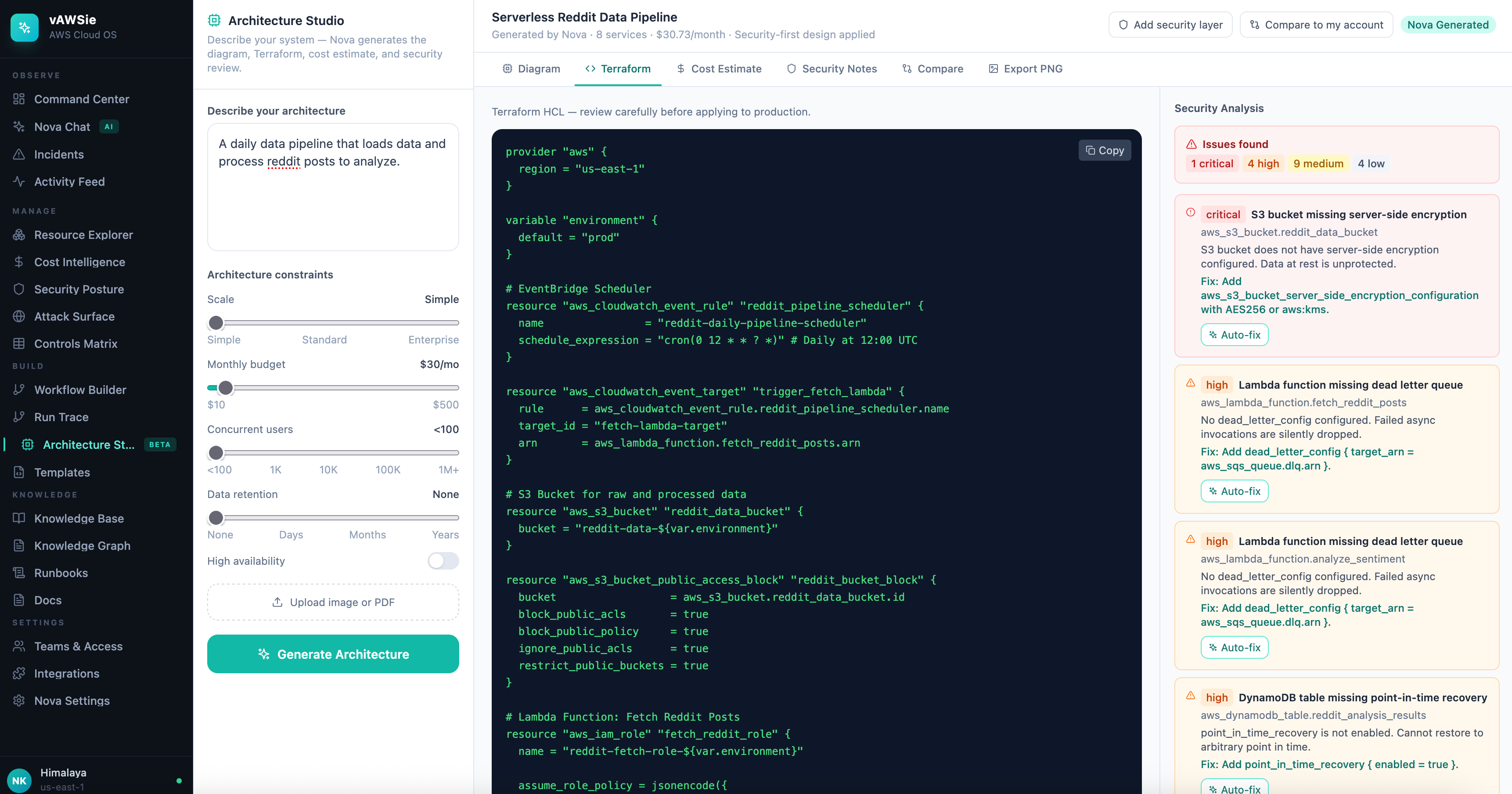
Terraform validation was run as a separate analysis pass rather than delegated to the model
Each terraform block is run through every matching rule, to find security issues, example:
S3-001 critical — no server-side encryption (aws_s3_bucket_server_side_encryption_configuration missing)
S3-002 high — no public access block resource
S3-003 medium — versioning not enabled
S3-004 low — no access logging
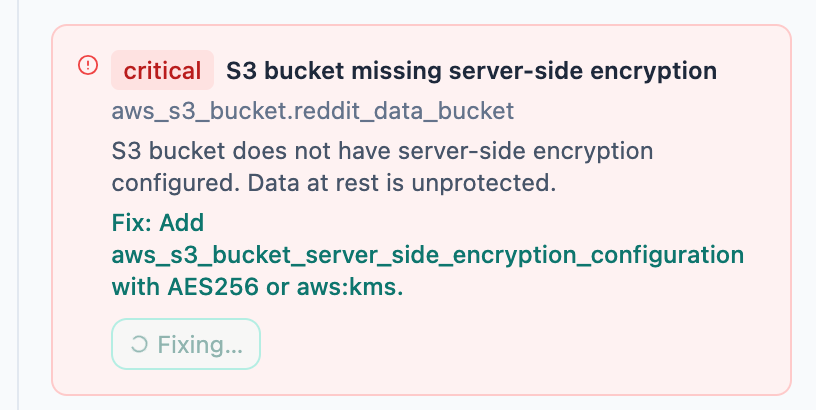
each finding gained an Auto-fix action that called
POST /api/architecture/fix-terraformafter a fix, the page re-ran validation and updated the remaining findings
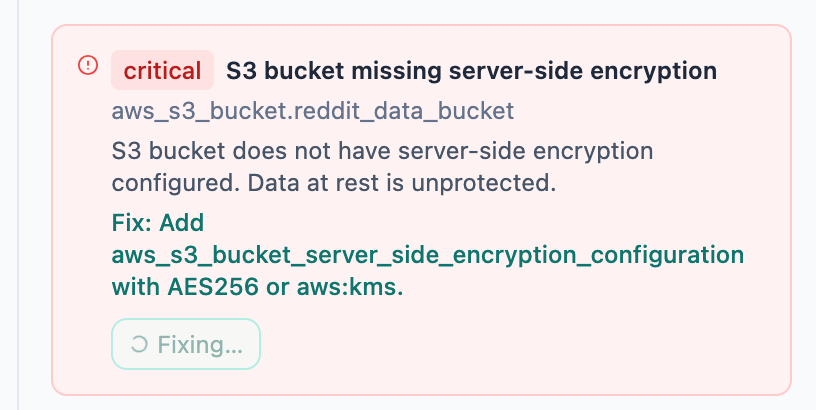
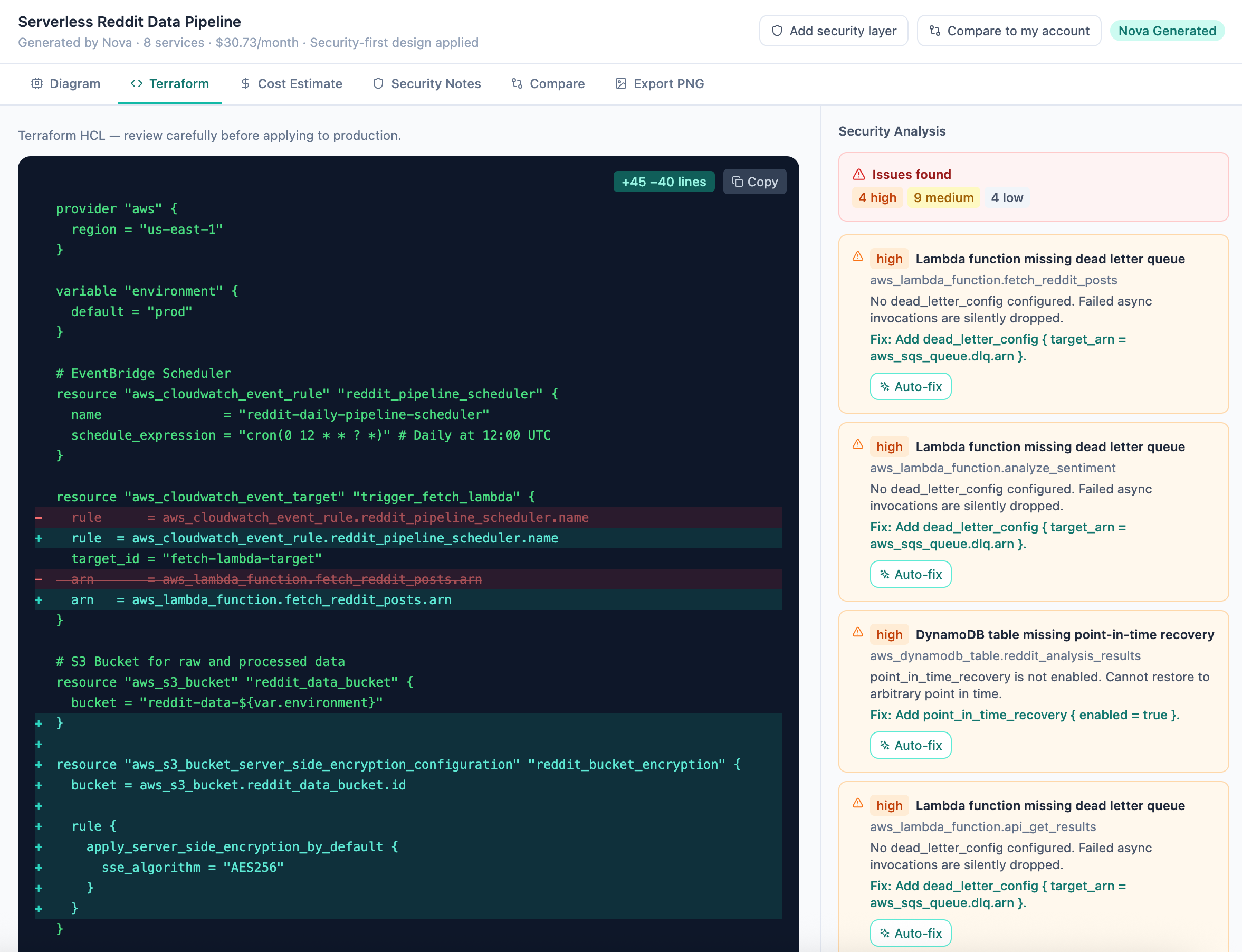
This is one of the strongest patterns in the whole feature. The model generates a starting point, but the product owns the safety loop around it. That is a much healthier architecture than asking the model to both produce infrastructure and declare it safe.
B. Make AI output survivable before you make it impressive
The next problem was AI output reliability. Generative systems fail in messy ways:
malformed JSON,
partial responses,
retries needed on transient failures, and
silent fallbacks that make users think the model succeeded when it did not.
So the next technical step was not adding more intelligence. It was adding a recovery contract.
Reliability hardening for architecture generation
JSON repair before parsing
shape validation after parsing
bounded retries with exponential backoff
explicit
_metaresponse fieldsfrontend source awareness for LLM vs fallback
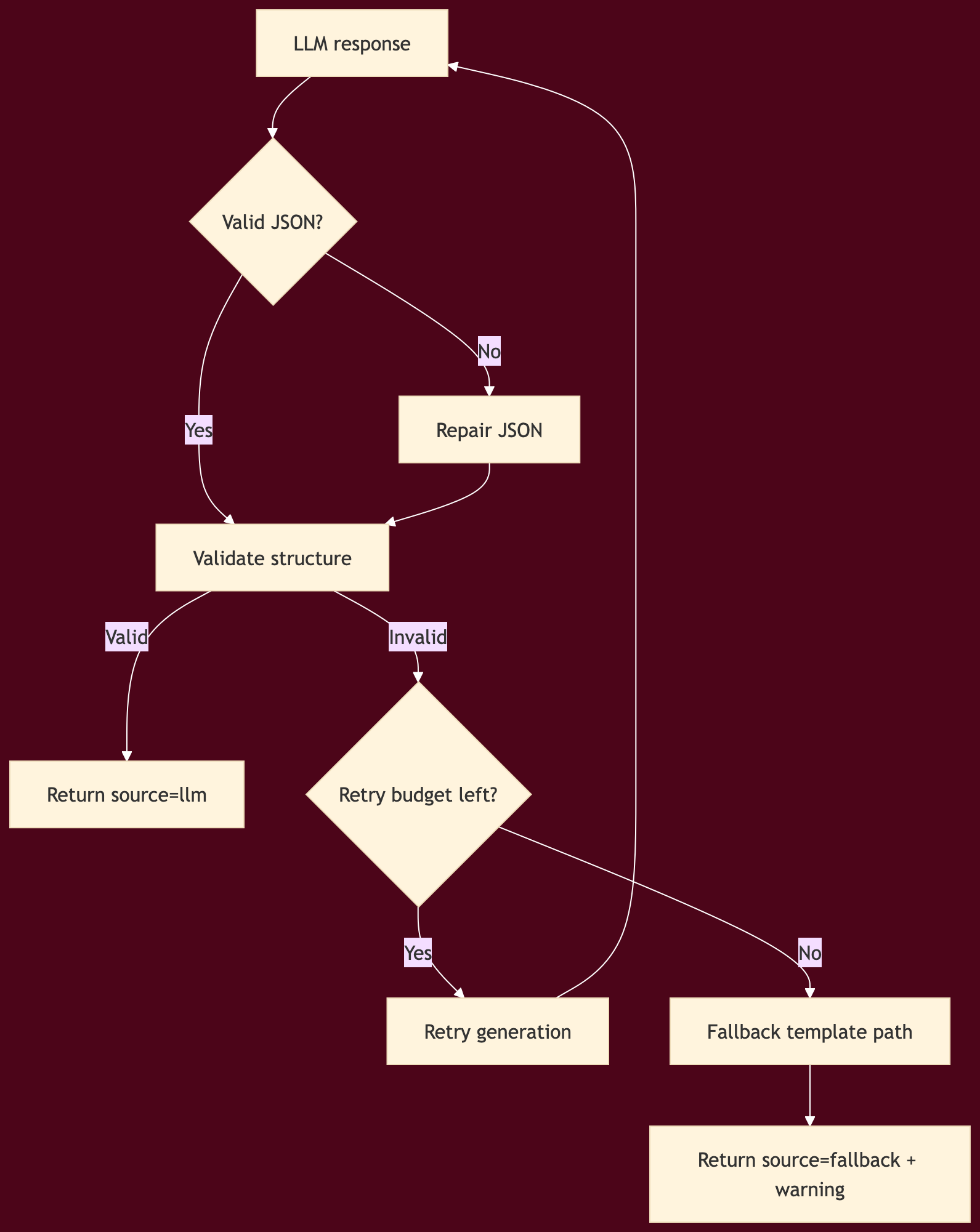
Before this step, Architecture Studio could fail invisibly and recover by quietly switching to a template.
After this step, users could see whether the result came from the model, from repaired model output, or from a fallback path.
That matters in a cloud product because the user is making infrastructure decisions based on what they see.
Practical lesson
If you are building any AI-native design surface, do not ask “can the model output JSON?” Ask instead:
What happens when the JSON is incomplete?
What happens when required fields are missing?
What happens when the model succeeds semantically but fails syntactically?
What does the UI show when recovery logic kicks in?
Those questions are the difference between a demo and an engineering tool.
C. Put AWS access behind one credential boundary
Once the product moved from static behavior toward live AWS state, credential handling became the next hard boundary.
This is where vAWSie needed to stop treating credentials as incidental configuration and start treating them as infrastructure.
The resulting pattern was a singleton credential manager with three supported credential sources:
user-provided credentials
environment variables
AWS CLI profile
Validation was done through STS identity calls, and all AWS consumers moved to a shared getClientConfig() path instead of building ad hoc client configs in each service.
Credential architecture
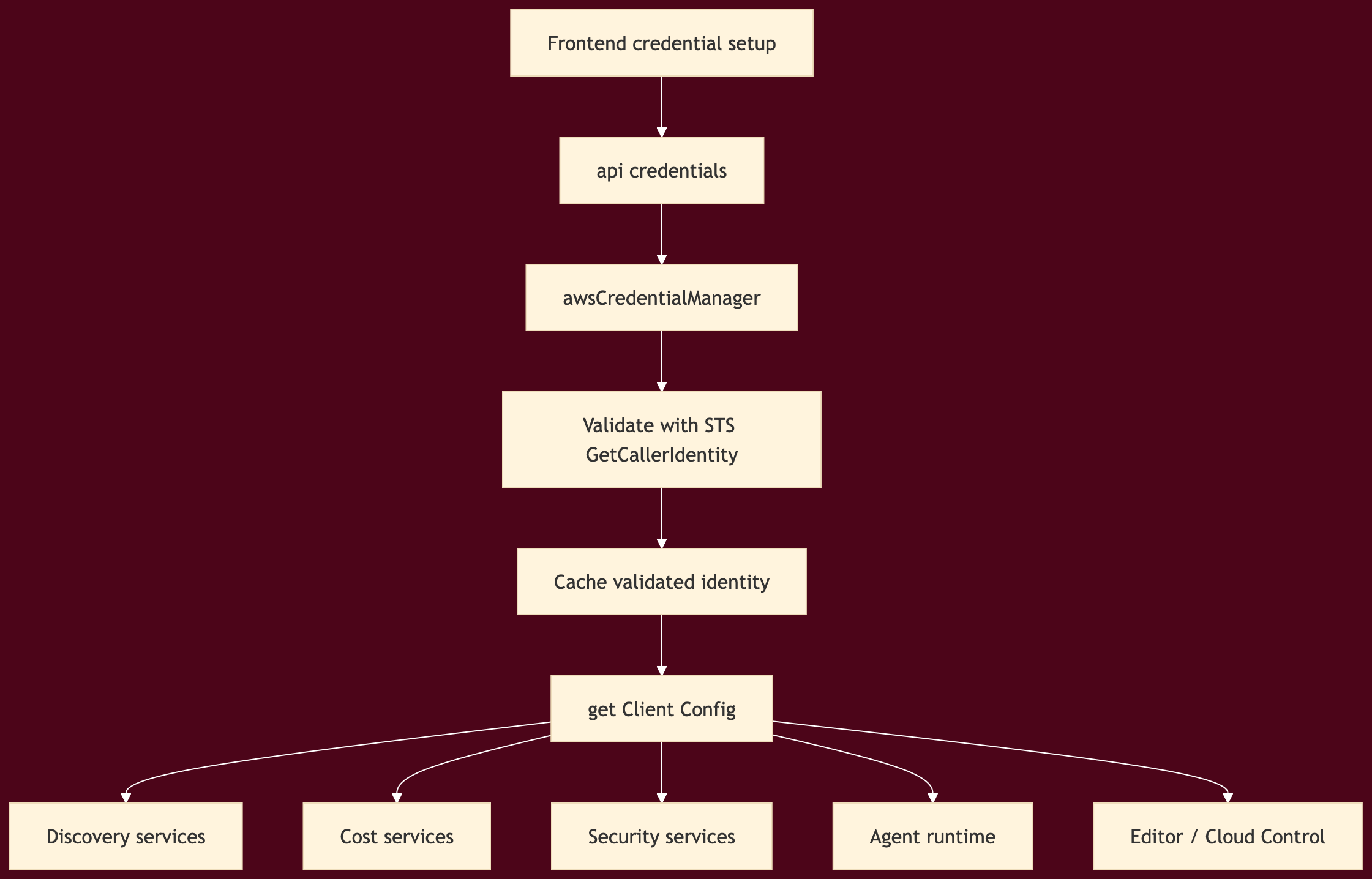
This was one of the most important internal refactors because it removed an entire class of inconsistencies.
Without a shared credential boundary, every AWS feature becomes a separate negotiation:
Architecture Studio authenticates one way
Resource discovery authenticates another way
Nova tools authenticate a third way
Cloud Control integration authenticates a fourth way
That is how systems become flaky and difficult to reason about.
The rule to follow
Any product that wants to behave like an operating system needs a single answer to the question: how do we talk to the cloud?
vAWSie’s answer became:
validate once → cache identity → expose one client configuration path → let every downstream service consume the same boundary.
D. Separate model routing from product logic
After credentials were stable, the next layer was model orchestration.
vAWSie needed to work with Bedrock-backed Nova models when AWS credentials were available, but it also needed fallback behavior when they were not. The implementation solved this by introducing explicit model configuration and a Bedrock service wrapper rather than letting model calls remain scattered.
Model selection pattern
modelConfig.tsdefines model roles and resolution logicNovaBedrockServicewraps Bedrock runtime accessstrandsRuntime.tschooses Bedrock-backed runtime when AWS is configuredfallback models remain available
That sounds like a small detail, but it keeps the agent runtime replaceable without rewriting the product.
The larger principle is this: model choice should be a configuration concern, not a feature concern.
E. Make the runtime observable before you make it more autonomous
Once vAWSie Chat moved beyond simple responses, the product had to answer a new question: what is vAWSie doing right now?
The answer was not another chat bubble. It was a typed execution timeline emitted over SSE.
Processing-state runtime
vAWSie’s runtime was instrumented into three visible phases:
thinking
tool_calling
generating
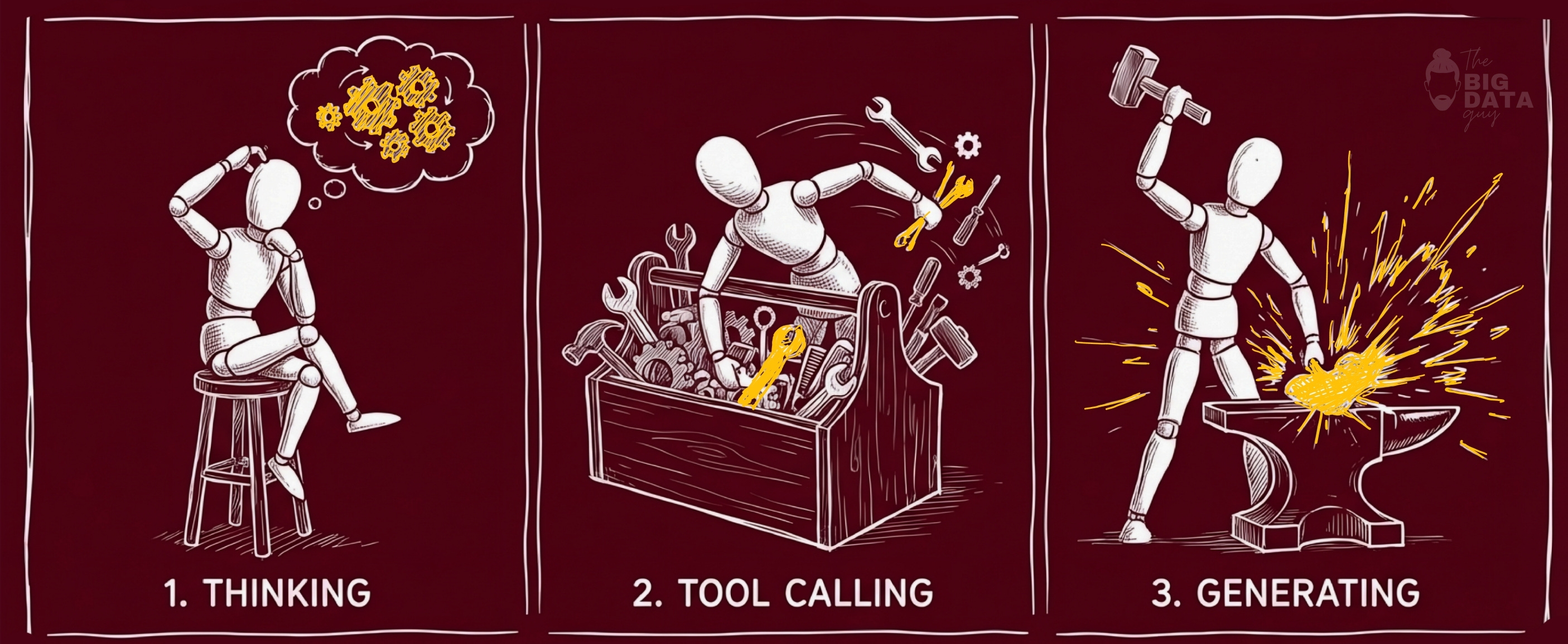
Then it went further:
per-phase timing
collapsible tool summaries
persistent trace footer on each final message
accessibility attributes for expandable execution state
This matters because agent systems become harder to trust as they become more capable. Visibility is part of the control plane.
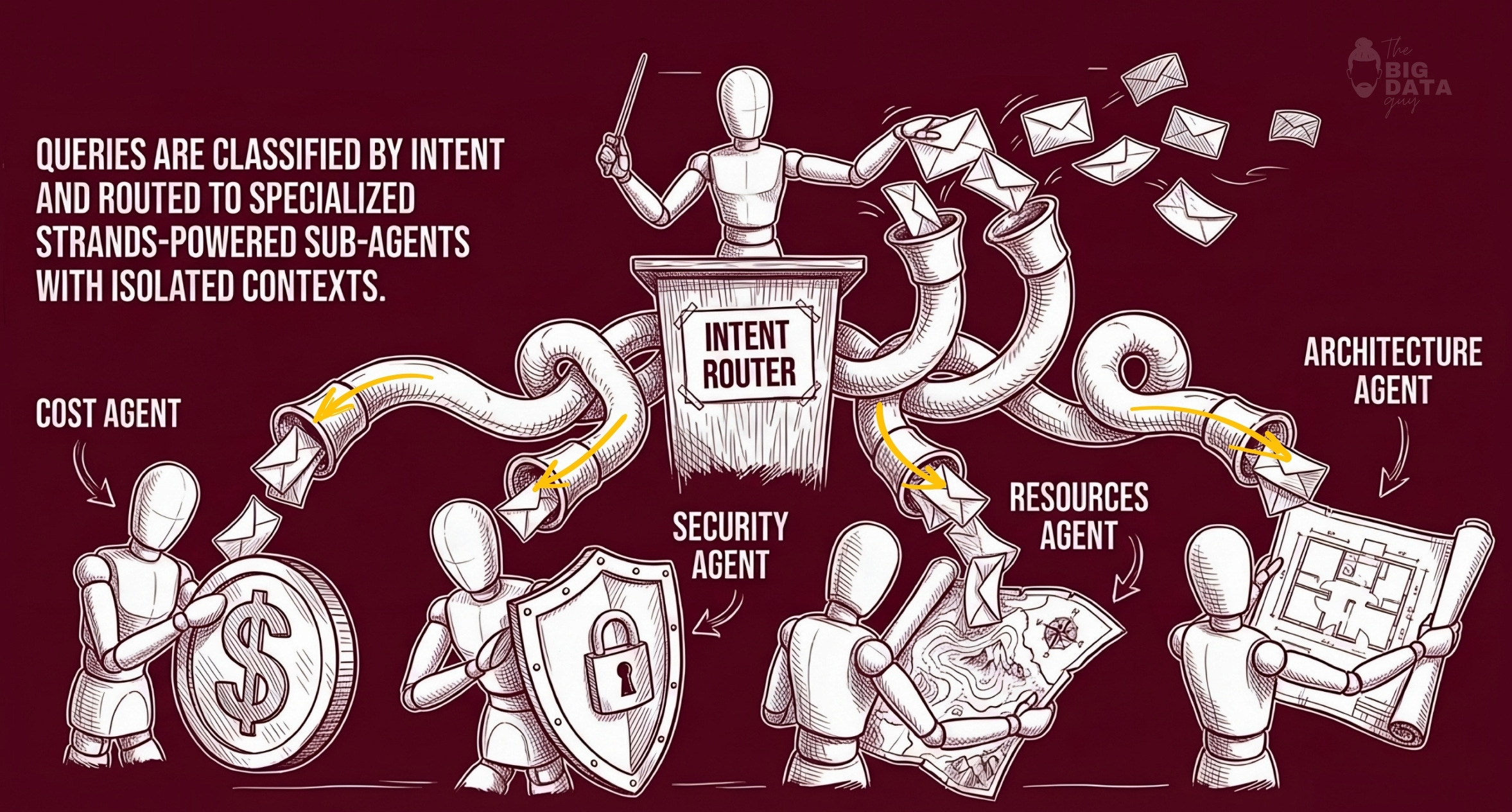
Multi-agent orchestration
The runtime then moved from a flat tool model to an orchestrated “agents as tools” pattern, powered by AWS Strands Agents SDK:
cost agent
security agent
resources agent
architecture agent
one top-level orchestrator
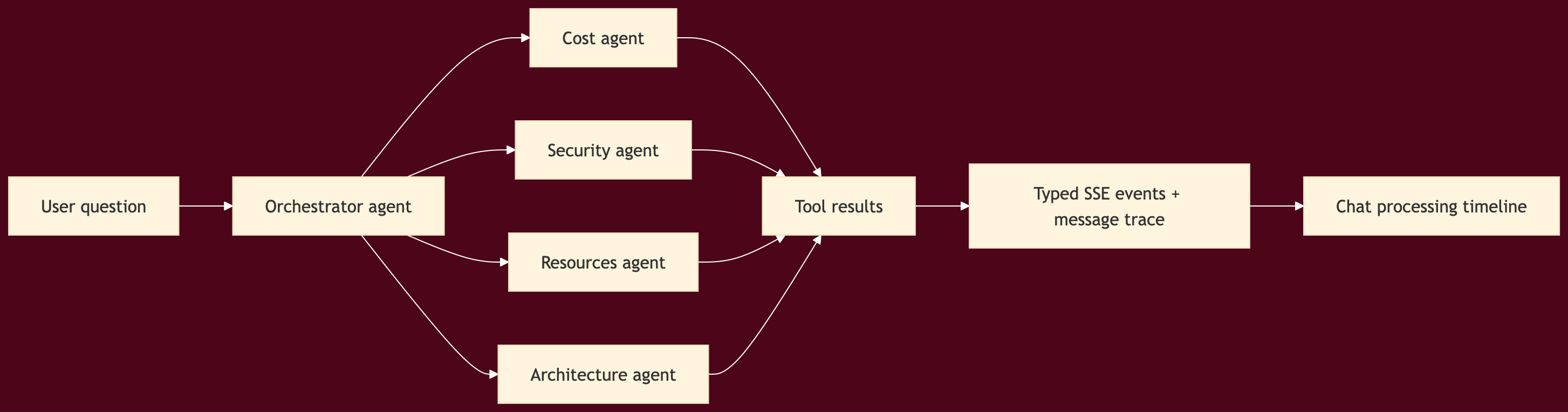
The important implementation detail here is that the specialization lived in the runtime, not just in prompt wording.
F. Templates were not just content
Document processing work looks, on the surface, like a feature addition. In practice it did something more valuable: it forced the workflow graph to become richer.
The product gained:
three document-processing templates
cost metadata per 1,000 docs
dedicated document-processing section in templates
four new editor node types: source, extractor, validator, store
editor support for pattern-specific config fields
supporting knowledge articles and ADR-style content
This was technically important because it moved Nova closer to being a reusable workflow system rather than a generic canvas.
Templates did three things at once:
gave the user higher-level starting points
stressed the node library with real workloads
connected editor, templates, knowledge, and chat into one loop
That is exactly what you want in an AI-native operating product: not isolated features, but shared underlying models.
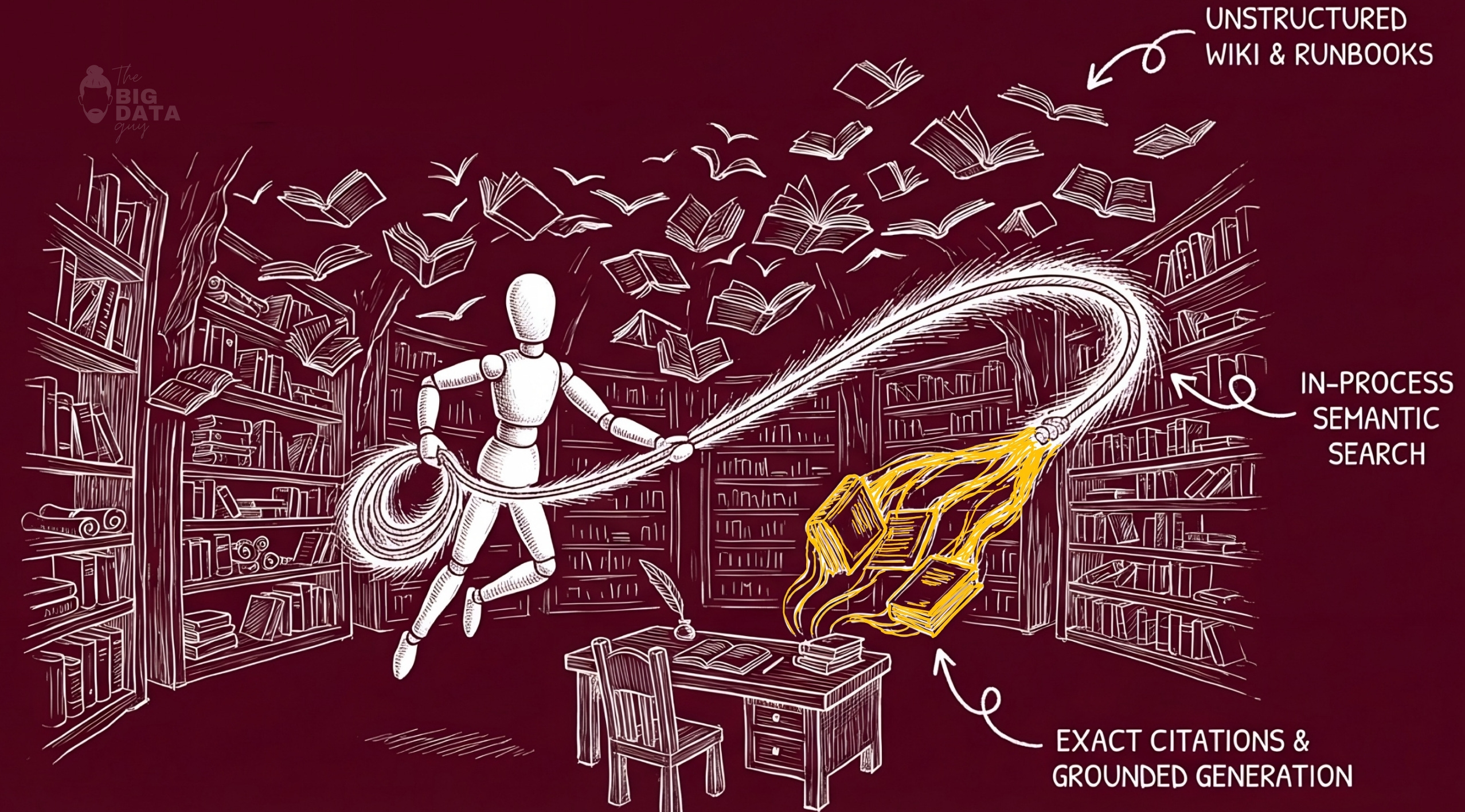
G. Add a knowledge plane, not just a document browser
The Knowledge Base evolved in four steps:
semantic retrieval over local knowledge articles
multi-turn sessions with TTL
Bedrock-backed RAG when available
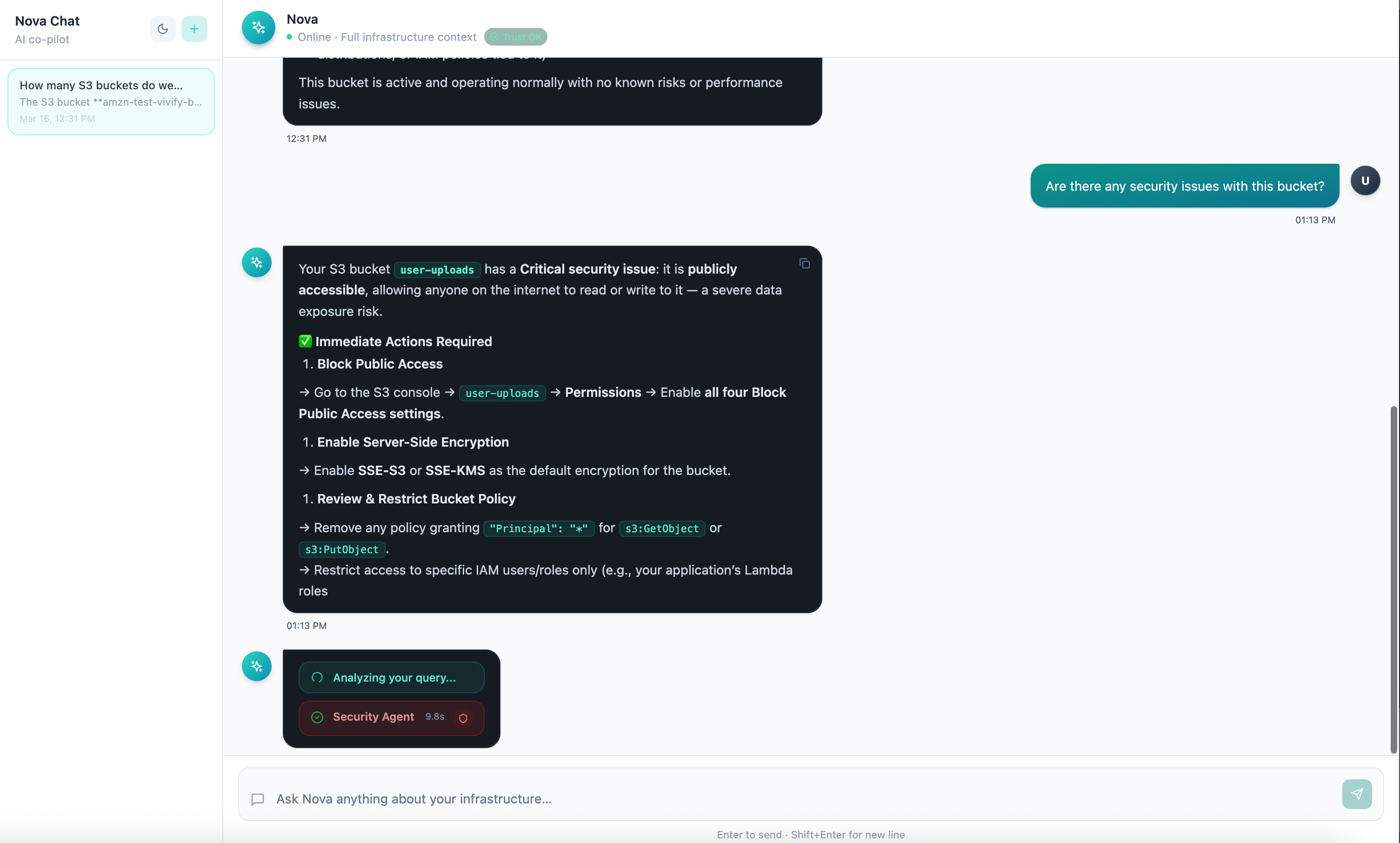
inline citations in both Knowledge Base chat and Nova Chat
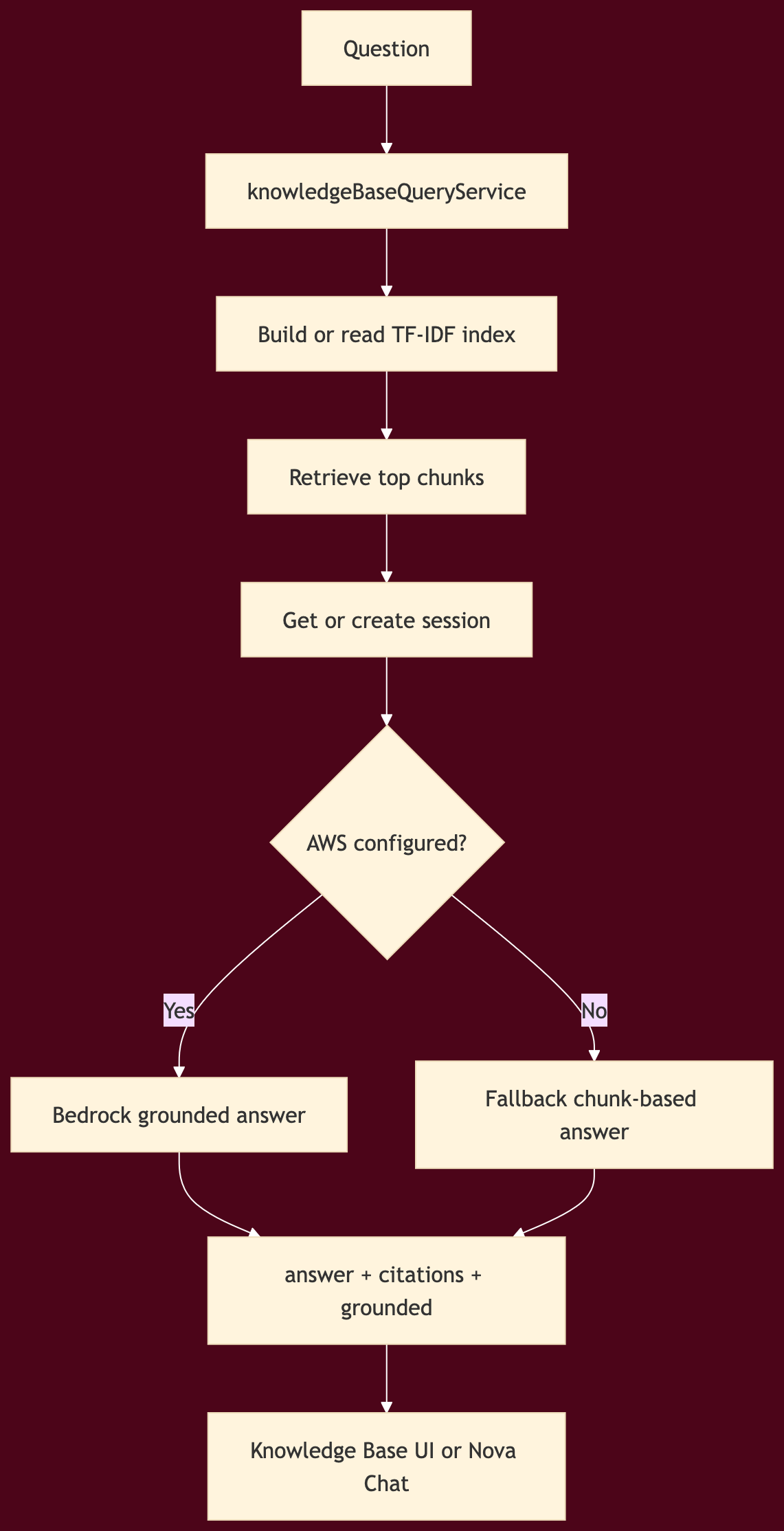
Knowledge query flow
A few things were smart about this design.
First, the system did not wait for a full vector database platform to exist before shipping grounded retrieval. It used TF-IDF and chunk similarity as a practical first stage, then allowed Bedrock-grounded generation when configured.
Second, citations were treated as structured output, not hidden metadata. That made them renderable in both the dedicated Knowledge Base page and in Nova Chat.
Third, the knowledge plane did not live in a separate product silo. It became another runtime tool available to Nova.
That is the right pattern. Knowledge should be callable from the operating layer, not trapped in a separate tab.
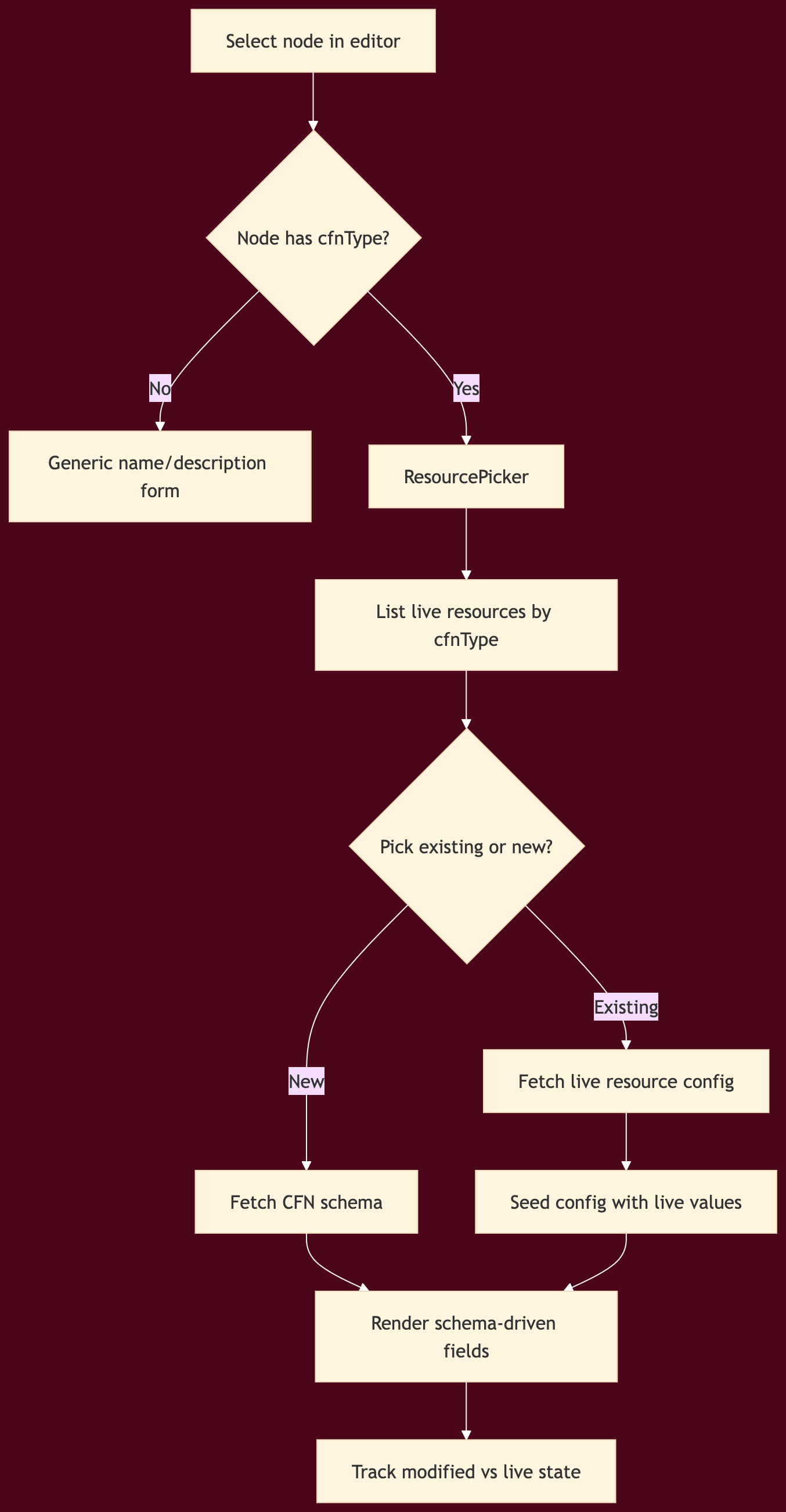
H. Make the editor cloud-aware through schemas
This was one of the most important architectural upgrades in the entire build.
Originally, a workflow node could easily collapse into a glorified static form. That does not scale. It also does not reflect live cloud state.
The solution was to drive editor configuration from Cloud Control and CloudFormation schema rather than from hand-authored per-node conditionals.
Editor sync and config flow
What changed technically
Cloud Control service with cached list, get-resource, and get-schema operations
editor API endpoints for resource and schema access
cfnTypemapping added across all AWS-backed nodesConfigPanel.tsxrewritten to become schema-drivenResourcePickerintroduced for existing/live resource selectionlive values marked distinctly from locally modified values
non-CFN nodes gracefully fall back to generic configuration
This upgrade did two critical things.
First, it reduced hardcoded editor complexity. Instead of adding a new hand-built form every time you add an AWS resource type, you let schema drive most of the field surface.
Second, it unified design mode with account reality. A node could now represent either something you want to create or something that already exists in the account.
That is a major step toward treating the editor as a cloud IDE instead of a toy diagram canvas.
I. Push operational best practices into the node model itself
Once nodes were schema-driven, the next question became: what product behavior belongs above schema?
Two strong answers emerged.
a) Lambda Powertools overlay
Instead of burying operational best practices in docs, Nova added a Powertools overlay directly into Lambda configuration.
That created a second layer of node setup:
infrastructure fields from schema
operational overlays from product opinion
The overlay exposed toggles for:
structured logging
tracing
idempotency
batch processing
The key design choice was to keep this separate from raw configuration state. That prevents product-level enhancements from colliding with CFN-driven schema data.
b) Workflow security linter
The other major addition was a graph-aware linter over the workflow itself.
This is where execution permissions, safety, and approvals start becoming real.
The linter operated before deployment, directly on the workflow graph, with rules across services such as:
Lambda
SQS
S3
DynamoDB
API Gateway
IAM
Step Functions
Secrets
It also included a wildcard rule for hardcoded secrets in any node config.
That is exactly the sort of safety boundary Nova needs.
Test Flow remains a place to learn → Publish becomes a governed action.
This is also where the system starts to hint at a stronger approvals model. The linter is not the full approvals system yet, but it establishes the pattern:
analyze before action
classify risk
surface remediation
block high-risk publication
If you were extending this into a full enterprise-grade control plane, the next obvious step would be policy-based approvals layered on top of safe_to_publish.
J. Live pricing and validation turned generated output into something inspectable
Architecture Studio then picked up two more important control surfaces.
Live pricing
Static or model-guessed costs were replaced by a pricing service that could query live AWS pricing, cache results, and enrich both generated architectures and discovered resources.
That touched several places at once:
architecture generation cost replacement
fallback architecture enrichment
cost tab live fetches
resource discovery cost enrichment
Nova pricing tools for chat
The important design pattern here is not “show cost.” It is “separate estimated from live.”
That distinction should exist anywhere a cloud OS makes claims about money.
IaC validation
Generated Terraform then gained a validation path with rule-based findings and safe/unsafe signals before deployment.
Together, pricing and validation created a better inspection loop:
generate
inspect
price
validate
then consider action
That is much closer to how experienced teams reason about infrastructure.
K. The deeper point: the product became safer as it became smarter
The easy path would have been to keep adding generation.
Instead, the system evolved in a better direction:
more grounded inputs
more visible runtime behavior
more consistent AWS access
more live cloud awareness
more explicit validation
more guarded publish semantics
That is the pattern I would recommend to anyone trying to build a similar product.
Do not race straight to autonomous action.
Build the layers that make autonomy inspectable.
Build the layers that let users compare desired state to real state.
Build the layers that let the product say not just “here is a workflow,” but also “here is what it maps to, what it costs, what it violates, and whether it is safe to publish.”
That is where an AI-native cloud interface starts becoming an AI-native cloud operating system.
L. Where execution permissions and approvals go next
The current architecture already hints at the next serious step.
Right now, Nova has:
credential validation
shared AWS client configuration
schema-aware live resource sync
publish-time lint blocking
runtime traces
knowledge-grounded operator assistance
The next layer is to turn those into a full execution governance model.
That would likely include:
explicit action classes: read, suggest, stage, apply
per-action permission scopes
role-based approval chains for publish or mutate operations
policy packs tied to
safe_to_publishdecisionstraceable diffs before infrastructure mutation
audit records that connect user intent, Nova suggestion, and final action
That is the natural continuation of the work already done. The product is no longer missing the foundation. It now has enough internal structure to make approvals and governed execution real.
And that is exactly why this implementation phase matters. It is where the product stopped being a set of promising screens and started becoming an actual cloud operating layer.
This is only phase one of our attempt to build an AI-native application. The goal here was not to finish the journey, but to establish the right foundations: the right abstractions, the right interaction model, and the right balance between intelligence, visibility, and control. There is still a long way to go, especially around deeper execution, stronger approvals, richer memory, and tighter integration with live cloud environments. But even at this stage, the process has made one thing clear: building AI-native software is not about attaching a model to an existing product. It is about rethinking the product around intelligence from the ground up.
I am still learning, still iterating, and still testing where this approach holds up in practice. If you’re building in this space, thinking about similar problems, or have strong opinions on where this should go next, I’d genuinely love to hear your suggestions.